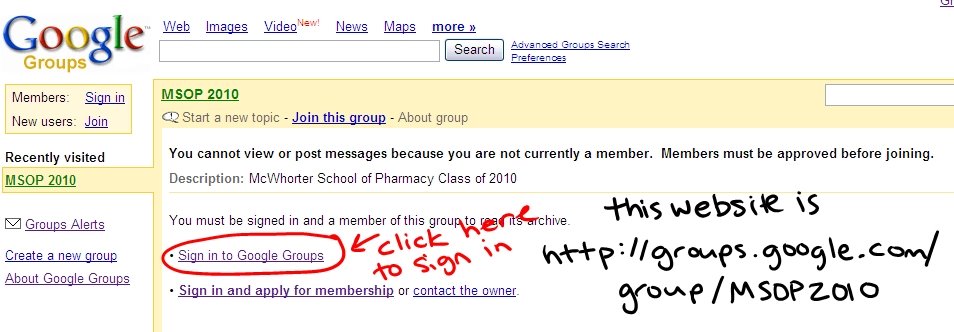
First thing first: our website is
Below is the page you will see when you visit the above link. (I know the picture is probably bad, but it is the best I could do.)
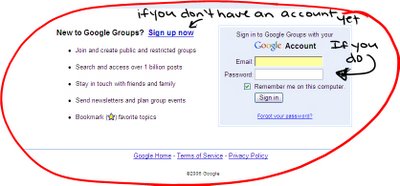
If you have not yest created your google account, you must before you can access the group's page. So click SIGN UP NOW. If you have not received an invitation to the group, or get a message saying that you must be added email me (dmchares@samford.edu)
If you do have an account already just sign in.
You will then be directed to our group's home page!
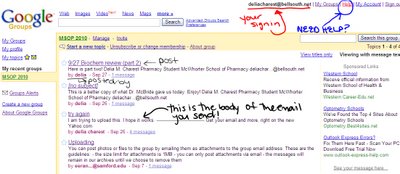 I know this picture is bad, but hopefully you can get a general idea of the layout.
Your information is featured at the top, along with a list of your groups, preferences of your account, help, and sign out shortcuts.
If you want to post you can click on Start a new topic, and you will be directed to a page that is set up for posting.
OR
If you want to post with an attachment simply send an email. It is really simple, here's how:
You can post photos or files to your group by emailing them as attachments to your group's email address. When doing so, please keep the following in mind:
- the size limit for attachments is 1MB
- you can only post attachments to a Google Group (not to a Usenet newsgroup)
- you can only post attachments via email (not through the GoogleGroups interface)
Once your message is in your group's archive, it will stay there as long as your group exists or until you remove it. Also, we don't offer a specific file storage system, so you'll need to find the message with the file in order to view it.
OUR GROUP EMAIL IS: MSOP2010@googlegroups.com
Here are some helpful help topics:
Getting started
Participating in a group
Troubleshooting
Also if you want to take a tour of google groups just click here!
I hope this helps everybody. Our group is going to be a great help to us. I will be linking a lot of helpful downloads from the group to this blog. SO please check the blog regularly. You can post comments or questions directly on this blog by clicking the comments link below. You do not have to sign in to post a comment, but if you do not sign in please put your name at the end of your comment so that we know who you are. Blog uses the same sign on name and password as the google group, so really everyone should be able to post a comment showing your name. Try it out and see how it works!


No comments:
Post a Comment